How NVidia impedes Free Desktop adoption.

There has been quite some discussion about Free and closed drivers and documentation
of hardware lately. Kernel
developers demand
open drivers, docs and development
processes, NVidia refuses to open
their drivers, arguing that the technical quality
is not a problem, and that the driver contains intellectual property they wish
to protect. Now ATI/AMD has shown that the intellectual property argument is at least not
universally applicable to graphics hardware vendors. Let’s also clear up a misconception about
the technical quality of nvidia.ko: The NVidia driver is the single component in a KDE4 /
Free Operating system stack causing us most of the hard-to-solve problems. In other
words, nvidia.ko has grave technical shortcomings.

The most considerate article in my opinion is James Bottomley’s essay on
“Linux Graphics, an essay about
three drivers”
. James puts NVidia’s position into the context of Free Software developers
and Linux kernel developers more specifically. I’d like to reiterate some of his points and
provide additional insight into how this looks like from the point of view of a KDE developer.
With NVidia just confirming that they won’t open up their process, this sadly appears necessary.
Let me start with some problems of NVidia’s closed driver model:

  • With an unclear licensing situation of those blobs, most distributors don’t dare
    shipping nvidia.ko in their default install, spoiling the out of the box user experience
    that Linux is able to deliver otherwise.
  • Performance and stability problems as we see them with KDE4 (and apparently
    Cairo-based rendering as well) spoil the user experience even more (see below).
  • Triaging bugs caused by those issues is hard to do and takes a lot of our precious time.
    Even worse, NVidia doesn’t seem to have the process in place to listen to those reports.
    nvforums seems to be the only way to reach NVidia people, it’s hard to tell where to go
    with specific questions or technical issues. As a result, interchange between Free Software
    people and NVidia engineers leaves much to be desired
  • Users suffering from those problems will likely just blame Linux and try to not burn
    their fingers on Free Desktop systems anymore, let alone recommend it to others.
  • Not being able to help users with their problems caused by nvidia.ko is very
    frustrating, both for users who end up with a screwed system and developers not being able to
    help those users and still getting all the bad press.

Let’s not forget to pin down at least some of the technical problems as detailed as possible.
Two of the most annoying problems I am myself able to reproduce:

  • Temporary screen
    lockups
    . Suffering from this myself, I’ve done some research on the web. There were
    suggestions around that NVidia locks the system for some seconds when switching between
    powerstates. Disabling powermanagement through a kernel module parameter should have done the
    trick, it didn’t do it here. Besides that, I would not feel comfortable with that, having a
    passively cooled video card and at least trying to not burn too much energy these days. Global
    climate change and local one (it’s already quite hot in this room) getting in the way.
  • Bad windows resizing performance.
    Resizing a transparent konsole window takes approximately 5 seconds here. It’s slightly better
    with a non-transparent mode (and other applications), but still far worse than on my ATI card,
    and also far worse than in KDE3. Switching virtual desktops here (composited or not) takes
    some seconds, just enough to break my flow of working.

(I’ve run into those problems with various different kernels, tried Ubuntu’s last couple of
release, same problems on OpenSuse). Currently, I’m now using the 177.13 driver, but I had the same
problems with older versions as well. According to some, a lot of those problems have
to do with the fact that NVidia drivers do not make use of the existing infrastructure in X
(XRender, XAA, EXA) and Qt uses those quite heavily, if available (Qt4 much more than Qt3
apparently). Now imagine someone wanted to merge a driver upstream which works around those
acceleration infrastructures. No way upstream developers accept it, and rightfully so. Why?
Well, check out the above list of problems. The conclusion here would be that NVidia not only doesn’t
play by the rule of the game regarding licenses (it’s still highly doubtful if nvidia.ko
has legal problems), or by the development process (no docs, no sources), they also just
write technically bad code (lacking support for those acceleration techniques, kernel oops
statistics from James’ essay).

Reading comments of users over the Internet, there seem to be two patterns in the responses:

  • “My system works, so I don’t understand those complaining about their Freedom. It’s
    more important that it works than that it’s free.
    “
  • “It doesn’t work, Linux sucks, I’ll stick with Windows.“

Both reactions show the problem from a very individual point of view — which is fair enough.
However, both opinions do not take into account the problems we, as Free Desktop developers
run into. We have to waste a lot of time and end up frustrated because we’re not able to
support our product as good as we would like to.

I can only guess about the reasons behind NVidia still being bone-headed as they are and
not moving a bit. James brings up that they simply do not have the resources to support their
product properly in a Free Software ecosystem. That seems the most logical explanation to me.
Now resources in a company like NVidia have a lot to do with priorities, in turn, those
priorities are often
a function of market share. In this light, we end up with a self-fulfilling prophecy. Market
share is kept low by Nvidia’s poor support for the Free Desktop, which in turn makes them
keep resources low for supporting those systems.

So how can we solve this problem of not being able to support our users properly? There are
in fact a number of ways:

  • NVidia’s engineers could be more approachable to us.
  • Nvidia’s engineers could pay more attention to the world outside their forums and
    actively engage with relevant developers to solve problems
  • We could recommend hardware from other vendors. Less nvidia cards around make for
    a smaller group of people running into those problems. Voting with your purse makes yourself
    a happier user and might, maybe, in the far-away future have people over at Nvidia read the
    writing on the wall.

As a Free Software developer, user and advocate, I feel screwed by NVidia, and as a customer,
even more so. I would recommend not buying NVidia hardware at this point. For both political
reasons, and for practical ones: Pretty much all other graphics cards around there work better
with KDE4 than those requiring nvidia.ko.


Your Rough Guide to Plasma.

the default Plasma desktop in KDE 4.1-beta1.
So I’ve chosen to become

Shane’s Personal Plasma Steward
. This in turn makes me
much more aware of things, that I personally take for granted which aren’t so
natural (yet) to others. One of those things is “How does this thing work?” (for
“plasma” as value of thing). Let me explain on a high level how you can use
Plasma and make the most of it, starting with a default Plasma desktop.

Plasmoids and Containments

The essence of Plasma revolves around two basic concepts: Plasmoids and
Containments. Plasmoids are Applets, small applications that live on
the desktop. Containments are applets as well, they act as container for
Plasmoids. That’s it. Really. On a default desktop, there are two main elements:
the Panel and the desktop itself. Both are containments in the Plasma sense.

The Panel

The panel holds a couple of Plasmoids, starting from the left, there’s the
Kickoff application launcher. You can use it to start
applications, open recently opened files and the usual logout/shutdown options.
There’s also a structure that allows you to browse through your applications.
The layout has been optimized for the usecase that is most common: starting an
application. The default tab is the “Favorites” tab that holds you most-used
entries. In the beginning, you’ll probably find yourself using the Applications
tab more often. Once you have found out what your most frequently started
applications are, right click on the items and add them to your favorites (or
directly into the panel or on the desktop. Note that you need to “unlock” Plasma
by means of right clicking on the desktop for any kind of modification). If you
prefer KDE’s traditional menu-style application launcher, change it to use that
by right clicking on the menu button “Switch to Classic Menu Style”

The next icon (looking like either a desktop computer or a laptop, depending on
the type of machine) is the devicenotifier. Plug in a USB disk
and it will pop up a dialog that lets you open the device in Dolphin.

The next item on your panel is the pager. It allows you to
switch between your virtual desktops. If you change the layout of the pager
through the “number of rows” option, it will also affect the layout and
animations that are shown in KWin’s DesktopGrid effect —
(Switch on desktop effect, press [CTRL]+F8 to see it.) For bigger pagers
switching on “Display windows icons” on the pager makes sense.

The taskbar is up next on the panel. It shows an area for all
open windows on the current desktop by default. You can make it show all windows
by checking “Traverse Windows on all desktops”. Right clock on the window frame,
choose Window behaviour, find this option in the “Focus” dialog. KWin’s The
expose effect offers similar functionality, it lays out all windows on the
screen, start typing to filter the list, navigate with either mouse or arrow
keys. The size of the text on the taskbar items can be set in Systemsettings |
Appearance | Fonts | Taskbar.

Next on our default panel is the digital clock. This clock can
display the time in different timezones. The sizing of the clock is half
witchcraft, but you can partly influence it. The clock will adjust its font size
to the area it is given by the surrounding containment (that’s the panel in this
case). If you choose to display the date, this date will be rendered using the
“Small font” option from Systemsetting’s Font dialog. The time will take the
rest of the space. That means that for those who want it, it’s possible to screw
up the clock’s display. On the one hand, the clock has to obey the user’s
setting for Small font (this setting reflects the “smallest readable font”, by
its very own definition, it simply does not make sense to use fonts smaller than
that). So in the end, you’ll choose yourself the amount of information
displayed, and if that fits. If you want to display more information, make the
panel larger or put the clock on the desktop where it can grow freely.

The rightmost Plasmoid in the default panel holds the systray,
which is used by traditional applications as a dock. There’s not a lot to say
about it, other than “Plasma developers don’t like the systray for its archaic
architecture and want it to go away today rather than tomorrow”. You probably
know it from other desktop (even Operating Systems) already. It’s basically
a dumping ground for all kinds of things that you can better leave to their
own plasmoids.

Cashews

If you have unlocked your desktop (you can do that by right clicking on the
desktop, or when no application has the focus with [CTRL]+L), a small Plasma
logo will appear in the bottom right corner (it’s commonly named the “cashew”).
Click on this cashew, and the panelcontroller opens. The panel controller allows
you to reposition, resize and realign the panel. The Plasmoids living in this
panel will adjust their size automatically. Plasmoids have basic knowledge about
sizing, provided by the containment. They’re programmed to take advantage of
that size, and inform the applet about how much space they possibly need. In the
end, the containment gives a possible size to the applets, the applets obey.

Adding Applets

Unlock the desktop and you’ll be able to add and remove Plasmoids from panel or
desktop. You add Plasmoids by simply dragging them where you want them. Right
click on an applet to remove it. The “Add Applets” dialog also allows you to
mark certain applets as “Favorite” so you can find them back more easily.
The “Install new widgets” button allows you to add widgets you’ve previously
downloaded. Currently it supports native “Plasmagik” packages and Mac OSX
dashboard widgets. Widgets you install this way can then be accessed just like
regular, preinstalled widgets.

The Desktop

The desktop is in fact another containment. One that doesn’t put size
constraints on the applets. Applets can be moved and sized freely. On the
unlocked desktop, Plasmoids will show a frame when you move the mouse over them.
This applet handle allows you to move, resize, relocate and realign the panel.
It also allows you to drag Plasmoids on the desktop. The buttons in the corner
are used to resize, rotate configure and remove the applet. When rotated, a
Plasmoid will act magnetic towards 12 o’clock, so it’s easy to get them back
into sensible position. By default, most applets keep their aspect ratio when
they’re being resized. If you want to freely resize an applet, hold the [CTRL]
key pressed while resizing.

Right clicking on the desktop also offers you to configure aspects such as the
wallpaper used, and the Plasma theme. Both actions offer to download new
wallpapers and themes through KNewStuff.

With open applications, it quickly gets hard to see the Plasmoids on your
desktop. The Dashboard gets those Plasmoids in front of you,
much like the “Show desktop” functionality you’re used to from traditional
desktops.

KRunner

KRunner is a versatile mini-commandline. You can use it to start applications,
open webpages, access bookmarks, search through your desktop data, calculate
short equations, and many more. Pressing [ALT]+F2 opens the Krunner dialog. You
just start typing and KRunner will start searching matches as soon as you’ve
entered more than two characters. You can open the settings dialogue to learn
about KRunner’s functionality, provided by plugins. You can navigate through the
matches using the tab and arrow keys.

If you want to know what’s going on on your system, there’s the “Show System
Activity” button, giving you quick access to a list of windows and processes,
with options to monitor their output and kill processes.

“Activities” or the Zooming User Interface (ZUI)

The desktop toolbox, accessed via the top right corner has a button for zooming
out. Plasma allows you to have more than one activity. Basically, that is
multiple desktop containments hosting multiple sets of Plasmoids. Zoom out from
your current activity, choose “Add activity” to create a new containment, zoom
in to your new containment and customize suiting your taste. Plasma’s zooming
and KWin’s desktopgrid are similar in that respect, but there is a fundamental
difference. While virtual desktop are used to group and organise windows,
Plasma’s activities are used to group and organise plasmoids. This way, you can
switch between activities and have relevant plasmoids supporting the task you’re
currently trying to accomplish. You can create a “Freetime” activity, with comic
strips, a puzzle and other Plasmoids, and a work activity, with relevant RSS
feeds, calculator and calendar.

That’s it. Hope some of you understand Plasma better now, and that this blog
helps those that feel lost initially do a little less so.

GTK themes are fine again.

Two days ago, I’ve blogged about
the environmental variable that sets the correct path to the GTK theme was
broken. This made GTK apps use the default theme, which looks rather clunky.
Yesterday, Kevin Kofler and Rex Dieter committed a fix for this
bug. Rocking, dude! :-)

Are we breathing in the same rhythm?

Tom and
Aaron
discuss timing and release schedules, and development cycles. Aaron talks
about trunk/ and freezes therein should follow a natural lifecycle. This assumes that
the whole KDE community lives and breathes as one individual, synchronised and all.
So a development-and-release-cycle forces all developers into one rhythm. Everyone
has to follow this one release rhythm. It’s a good idea, but I think we should also
make the lives of those easier that choose another breathing ryhthm.
There are a couple of things to consider here. The most obvious being that we need this
flexibility anyway. We rely on certain release mechanisms and interface stability
policies in other projects as well. (We partly solve this problem by providing abstraction
layers, think phonon and solid). Now the interesting case is that Phonon, which is new in
Qt’s 4.4 release is also provided by Qt. Phonon now breathes in a 9 month release cycle
in Qt, and a 6 months one in KDE. So one could argue that it’s a smart idea to breathe
in the same rhythm as Qt does. We could follow up every release of Qt with a KDE release.

This does not solve the initial problem I think, which I think is “different parts
of KDE have different heartbeats”. Neither Tom nor Aaron have really
questioned the way we currently deal with SVN before
releases, so I’ll put on my shiny pink asbestos suit and do it.

What if we never froze trunk? Others (such as, incidentally
Qt) have no freezes in trunk/ and it seems to be a popular and well-working development
style for some. When a release enters a freeze, a branch is created that will
be stabilised towards the release. trunk/ at the same time stays open for feature
additions. The Golden Rule is “You don’t break trunk/ (this is what branches are for)”.

(For those not too intimate with development schedules of KDE: trunk/ is frozen
roughly 2 months in advance of a release (supposedly every 6 months). After the
actual release, trunk/ is opened again for new features. Features that take longer
than the allotted time be developed in a branch and moved into trunk/ “when
they’re ready, but not during freeze”.)

The obvious downside of this “It’s always summer in trunk” is that you need to
spend extra efforts to get people
to stabilise, i.e. working in a stabilise-branch rather than in trunk/. It needs more
discipline, and probably puts some extra weight on the shoulders of those who simply
care about good KDE releases. But as we all agree,
SVN sucks for branching and merging. So right now we make it hard for people to work
with different branches (stable/ and trunk/).
It would allow those that need more time to
do their thing to stay in sync with latest features. Basically, it would allow for
different rhythms in the community. As this community grows and becomes more diverse
this might pay off in the end.

New tools are on the horizon as well. Distributed version control systems allow
for a more flexible way of sharing code between peers.

The thing is that we cannot really choose, people are using git anyway. And after
having used it for a bit, and git-svn to interact with svn, I have to say that it
makes a lot of things much easier. For one, it doesn’t force the commit policy of
the project (“don’t break trunk” maybe ;-)) on yourself or your team, and it makes
it easy to share code with others. That might want to work one a feature (or some
surgery) together, but others (those that don’t want to be affected by this surgery
just want their desktop to work. Now imagine these peeps, just start developing
features by sharing a number of git trees and committing features to trunk/ when
they stabilise, i.e. presumably don’t cause regressions. It also nicely solves
another issue we had recently. Rafael needs some time to finish Goya (have it API
reviewed by Kevin ;-)), but Jeremy already wants to use this feature in
GetHotNewStuff2. Those three share a “review” branch, which is merged when
everyone’s happy (after having been announced on kde-core-devel. (Imagine
integration of some sort of peer review system, like review board with
this branch!). This development
style can partly be tested by a subproject, of course. This subproject can then
track trunk/ from SVN and develops features in a distributed way, probably with
another branch as master that sits on top of it and tracks. It’s not really a
technical problem, after all, the tools should support the natural way of
breathing for the community. For git in particular, I see the steep learning
curve as one of the major show-stoppers right now. It would, at this point
simply make the barrier of entering a project much higher, which is not a good
thing. With distributed source code management, the question “Which one is
the authoritative copy?” becomes a purely social thing. In the SVN case, it’s
always the SVN server, in the DVCS (OMG!) case, it’s “who you trust”, that
would be the version we publish via SVN.

Interestingly, the KDE’s Internationalisation people already work in a distributed
fashion. In the Netherlands for example, Rinse collects translations; that are sent to
him by the people in the translation team he reviews them and commits them to SVN.

Does this whole mess of an idea also contain a solution for “synching downstream”?
One of the reasons why the Release Team initially decided to adopt 6 months
releases is to make it easier
for downstream (distributions, for example) to ship a recent version of KDE.
The thing is that those distributions also have different heartbeats, OpenSuse comes
8-9 monthly, Fedora comes 6 monthly, others as well. Now we’re trying to
sync with upstream, in
different heartbeats and downstream in different heartbeats. Right now, we have
the unfortunate situation that we’re just too late for OpenSuse 11 (which is really
one of the symptoms of “heartbeats out of sync”). At last year’s Akademy, Mark
Shuttleworth brought up the idea of synching release over the whole Free software
stack. While this is a nice vision, I do not see this happen ‘globally enough’ so
that it really works. The trend
in the Free Software
world seems to be to move to a more distributed way
of development.

This “we all breathe synchronously” might be one of the things that ties us
together. We’ve seen this a lot in the time up to 4.0. That was where we as
a community acted as one and lifted KDE from ‘utterly broken’ into a
releasable desktop. In KDE 4.x, things are fundamentally different. With all
the new frameworks and libraries solidly in place now we we want this to be a
stable platform for a long time. That means we develop features on top of it
and fix bugs in the infrastructure and extend it – not break it. Basically that’s
the “Binary Compatible until KDE 5.0” promise.

Moving from one, proven style of development to another is something we
should not take lightly. On the one hand it would help us solving some
scalability challenges in the community (such as too many different people,
expectations, needs for their product and whatnot) and adopting new styles
of collaboration in a community where you’re free to share.

Things such as new ways of working together and the ever more diverse community’s
needs, expectations and lifestyles are not something we can ignore. We need to
constantly look at ourselves and our environement and think about how we can
improve it. Probably not one big step (“starting tomorrow we never freeze
trunk again, promised”) but hundreds of little baby steps.

Hideous GTK themes in KDE4 sessions.

For some time, GTK apps running inside my KDE4 session would not pick up their theme
properly, making them look hideous in their default theme. I’m using a small wrapper
script (/usr/local/bin/startkde4) to get my KDE4 desktop up and running. Since I’ve put
the “unset GTK2*” line into the script, GTK apps pick their theme again:

#!/bin/sh

export LD_LIBRARY_PATH=/home/kdedev/kde/lib
export KDEDIR=/home/kdedev/kde
export PATH=$KDEDIR/bin/:$PATH
export KDEHOME=~/.kde4

unset GTK2_RC_FILES

. /home/kdedev/kde/bin/startkde

If you’re still living under the “I use a GTK1 app” stone, put another line for GTK(1) apps
in there.

Hope this tip keeps someone from tearing out hair. :)

Non-linear animations in KWin.

Some time ago I’ve done a proof-of-concept how one can make KWin’s compositing effects
use non-linear timelines. Before that, a KWin animation would feel a bit static. Think
of minimising a window. It would abruptly start moving at a constant speed and stop at
some point in the same, abrupt way. Now we have a wonderful class in Qt, called QTimeLine
that provides some additional curveshapes, making it easier to show accelerated or slowing
down movements. After some discussions on the KWin mailinglist, I’ve implemented a smallish
wrapper class around QTimeLine that is tailored towards the needs of KWin’s effects.
After review by Mr KWin, Lubos, I’ve committed it to KDE’s SVN last Friday, and along with
it ‘port’ of the minization, the desktop grid and the coverswitch effect. Making those
effects use the new KWin::TimeLine class wasn’t hard at all (well, modulo on where I
needed some help ;-)). In fact, the coverswitch effect was done in 5 minutes during the
last beer of the Tokamak Plasma sprint. Now at least those three effects feel more natural,
less static. More effects will be ported later on, if you want to get your hands dirty, feel
free to have a look at it.

During the last week, we’ve done some more polishing to KWin effects. Aaron has made the
coverswitch effect more beautiful, and made the mousemark one (the one that shows stars
revolving around your mousepointer) a bit less jumpy — it now ‘feels’ like it’s always
revolving, but not always shown — and not ‘start at position 0 whenever shown’. Last night
I’ve excluded some window types from the brand-spanking-new Wobbly Windows effect in KWin.
Previously, menu would wobble as they pop up, making for a hectic user experience when
opening various menus in short order. It seems that not all Windows know what they are,
but at least having it working for menus is quite an improvement already.
I’ve also
made windows become translucent as they are being minimised, making it look a bit fancier.

Hacking on KWin is actually a lot of fun. You can do a lot with very little, the code in
most of the effects is (at least partly) easy to understand and modify, and the results
are very visible, which I think is a good motivator.

We broke Plasma.

After Alexis has torn Plasma into pieces yesterday, some brave individuals svn up’ed, rebuild
kdebase and started putting the pieces backtogether. There are huge amounts of fallout right
now, but we’re getting closer to having some basic applets back. Currently digiclock, battery,
kickoff kind of work (modulo some layout problems in the panel), taskbar at least compiles
after some frenzy porting over the last hour. All this feels like a fast-track through the last
year-and-a-half through Plasma development. I can remember very well when we first saw a panel
and rudimentary clock appearing, the same happened today with much “ooooh” and “aaah” … :-)

But Why? you might ask yourself, it started to look polished and now it’s
broken again. Well, Plasma in KDE 4.0 was based on Qt 4.3. Qt 4.3 lacked the widgets-on-canvas
support Qt 4.4 has. That means that layout managers and widgets had to be written from scratch
for 4.0. Now KDE’s trunk/ requires Qt 4.4, including the widgets-on-canvas (WoC) support, we’re
able to use QWidgets, and maybe more important Qt’s layoutmanagers in Plasma applets and
containments such as the panel. So we were able to remove large parts of code in favour of
using Qt’s functionality — less maintainence burden, less bugs, less memory consumption and
all that included.

And while that fixing of the WoC fallout happens, the next round of breakage is on the horizon:
Kevin, Richard and Aaron and The WhiteBoard have gone through all the classes in libplasma in order
to polish that, remove braindeadness and a couple WTF’s
in the code. The plasma API should become much more intuitive, easy to use and future-proof. The
downside being another round of breakage and fixing all over the codebase. We expect the results
of the API review to hit trunk/ later this week — including the breakage it introduces. After
that, we hope that libplasma is stable enough to have it move over to kdelibs, currently that’s
planned for the 4.2 timeframe. I’ve put the
results of the API review
online. As to the “Which face does this SVN account belong to?”,
that’ll come later. Besides a working desktop, one needs something to look forward to. :P

So if you’ve compiled trunk/ after yesterday and wondered what happened and why someone visually
bombed it back into the stone-age (last year ;-)), now you know why :-)
If you want to help fixing up things, update trunk/, join #plasma on freenode like others do
and fix obvious breakage. It’s not necessarily hard, but there’s quite some code crunching involved.
Do tell others on IRC what you’re fixing so duplicate work is prevented. Looking at the current
flurry of patches gives you a good idea what to replace with what.

Of course this is all done during Tokamak, the Plasma sprint in Milano where we’re hacking
on your favourite desktopshell since last Friday. More exciting stuff has happened, but more
about that later, and of course in other Plasma hackers’ blogs. Suffice it to say, we’re
mightly productive and very cool things are on the road ahead.

fkefer is out of laptop.

So after we worked
on priorities
thanks to our awesome Celeste, Franz Keferböck showed us his
version of priorities. He visited us down here in Milano at the Tokamak Plasma Sprint,
bringing Stevie, his girlfriend, a case of fine Austrian beer, but unfortunately he forgot
his laptop at home. Now that’s what I call priorities. :-)

Lies, damn lies, … .

… and statistics. Last week, I took a python script that I had written some time ago for
CodeYard, modified it a bit and
analysed some recent KDE subversion logs. I’ve taken a look at the number of commits in
the KDE 4.0 branch, and a bit in trunk/. I’ve also compared number of authors and commits
to the KDE and GNOME Subversion repositories since 2004. I’m discussing my findings below.
Of course, being Free Software, research and all, I’ve put up the script and data so you
can run with it and create your own reality.


trunk since 4.0 has been tagged.

This graph shows number of commits and authors in trunk since KDE 4.0.0 has been tagged. We see the this
number is quite a bit higher than even the sum of bugfix and translation commits that has gone into the
4.0 branch. That, I think does reflect well that main development is taking place in trunk (no surprise
there), and that trunk is probably quite a bit ahead (in terms of instability? :)) compared to
4.0-branch.

I do not quite understand the high number of commits in the 4.0-branch. I’ve fed the log starting with
rev 757456 until HEAD to the script. I would’ve expected the number to be roughly the sum of 4.0.1,
4.0.2 and 4.0.3 logs. I wouldn’t be surprised if there a bug in my datacollection
script. Email me if
you know what’s going on there.

KDE and GNOME Compared


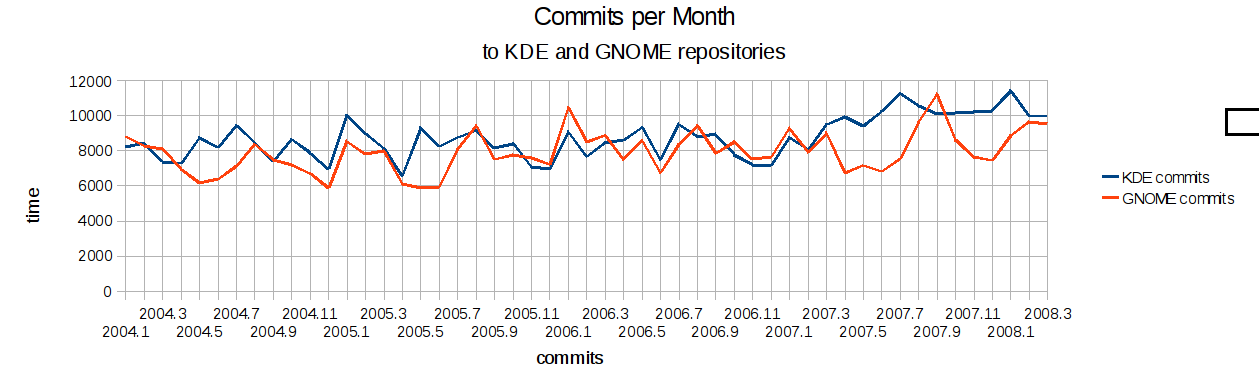
number of commits to KDE and GNOME SVN repositories.


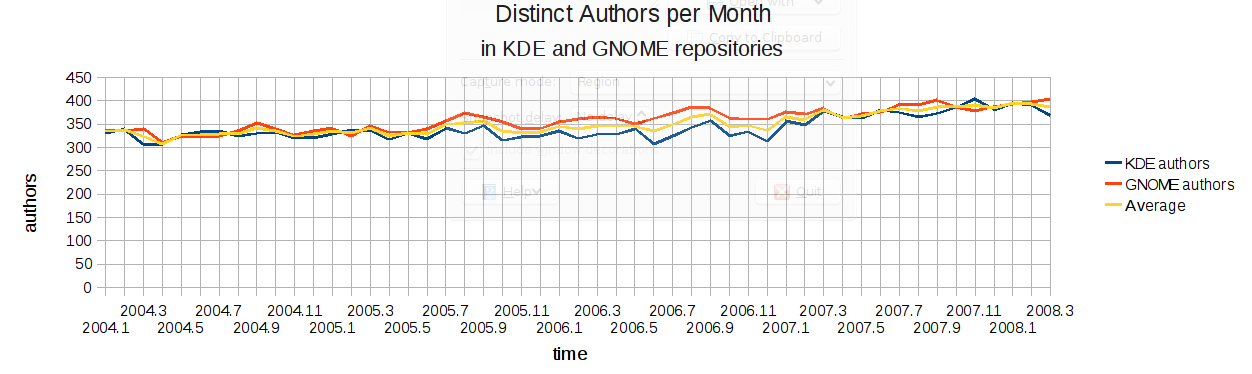
number of distinct authors in KDE and GNOME SVN repositories.

This graph gives a long-term impression of the number of commits and distinct authors per month in
both, KDE and GNOME subversion repositories. Some observations:

  • KDE and GNOME are pretty similar in size
  • Only recently (roughly since the beginning of 2007, there’s a real
    difference in the number of commits
  • Since the beginning 2007, the number of KDE commits has grown by ~20%
  • Lately, there seems to be more difference in the monthly numbers for GNOME
  • Because the numbers have been so close to each other, it’s looks like we’re not competing,
    but that what’s good for one is good for the other. So having GNOME doing well suggests that the
    climate for KDE is also friendlier. This has been less evident lately, however.
  • The number of rises close to their six-monthly releases
  • As of lately, the number of KDE commits is higher than the number of GNOME commits, GNOME has
    slightly more distinct authors monthly

  • There is certainly no exponential growth in the number of Free Desktop developers. If we
    believe these number which obviously(*1) do not include third party authors (*1) not
    as long as I define “third party authors” as “those not developing their software in KDE’s and
    GNOME’s SVN repos” anyway :-)

Of course you’re free to interpret those numbers in your own way, the above is just what I can
come up with when looking at those numbers. I’ve also put up the OpenDocument file with the raw
data in it, so you can play around with it in a similar fashion. Find it
here and show us your
interpretation of reality ;-)

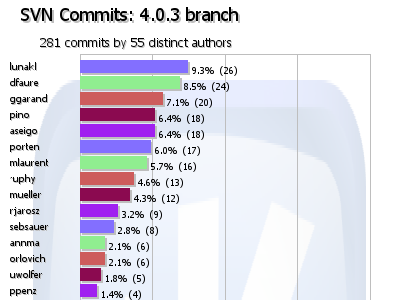
KDE 4.0 Branch


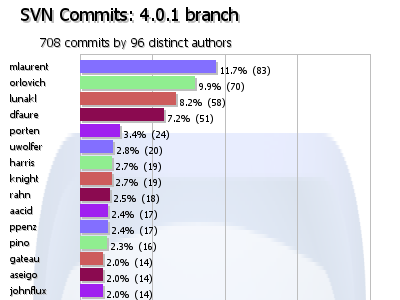
number of commits between KDE 4.0.0 and 4.0.1.


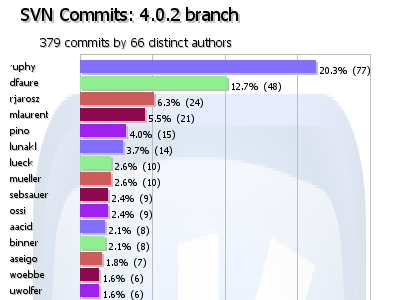
number of commits between KDE 4.0.1 and 4.0.2.


number of commits between KDE 4.0.2 and 4.0.3.

Here we see the number of commits to the KDE 4.0 branch in Subversion. Two things are striking:

  • The 4.0 branch is calming down. Reasons are probably that the
    more obvious bugs are fixed, and that more developers have switched
    to using trunk/ that is going to become 4.1 this summer. I would have
    expected such a trend.
  • KHTML and KWin people are doing really well (and “Plasma-Ruphy” in 4.0.2), this is also reflected
    in recent changelogs. It doesn’t say a lot about development progress,
    since the 4.0 branch is focusing bugfixes and performance improvements.