Solid Sprint Photo Blog

Sleep deprived as I am, I figured I’d do something more visual than my usual wall of text (quoting TGEN: "tl;dr", or for the markeys and others blessed with attention deficits, like me right now after a bunch of really intensive days :-)). So here goes the Solid Photo Blog, fresh from Madrid:

Alex Fiestas (Ale-Ale-Jandroooo), BlueDevil hacker, UFOCoder and kind host of the Solid bunch

Alex Fiestas (Ale-Ale-Jandroooo), BlueDevil hacker, UFOCoder and kind host of the Solid bunch.

Categorizer, Bluetooth hacker, new KDE-UDev maintainer and KDE-ES Vice president Rafael

Categorizer, Bluetooth hacker, new KDE-UDev maintainer and KDE-ES Vice president Rafael "ereslibre" Fernando Lopez. UFOCoder and kind host.

Kevin

Kevin "ervin" Ottens: Solid Maintainer, Sprint Kanban Manager and my pillow-talk mate for the sprint (I spare you the details, but notice the ghost behind ervin).

The cutest youngest aspirant Solid hacker, branched off in Nuremberg.

The cutest youngest aspirant Solid hacker, branched off in Nuremberg.

Solid Sprint Group PhotoMandatory group photo, top-left to bottom-right: Dario Freddi (PowerDevil), Will Stephenson (Network Management, openSUSE), Kevin Ottens (Solid Maintainer, KDE Mobile platform dude), Lamarque Souza (Network Management mobile broadband dude), Javier Llorente (openSUSE dude), Alex Fiestas (Bluedevil, upower backend), Rafael "ereslibre" Fernando Lopez (KCategorizedItemView, BueDevil), Albert ‘tsdgeos’ Astrals Cid (KDE-ES presidente, localization expert), Sebastian Kügler (Power & Network Management (Plasma) chrome, KDE e.V. dude, me, myself and I). Background: Our Kanban-based workflow, containing tasks for internal communication and progress-tracking.

Agustin Benito Bethencourt, Gran Canaria Desktop Summit organizer, ASOLIF contact and generally nice 'high-level-thinking' dude

Agustin Benito Bethencourt, Gran Canaria Desktop Summit organizer, ASOLIF contact and generally nice ‘high-level-thinking’ dude. (Missing in the group-photo.)

Madrid's Gran Via, early morning

Madrid’s Gran Via, early morning.

Clearly a Power Devil.

Clearly a Power Devil.

Solid Kanban Wall, the tasks being worked on on sticky notes.

Solid Kanban Wall, the tasks being worked on on sticky notes.

Hackers hacking.

Hackers hacking.

It's a hacker, and it runs on water, man. ON WATER, MAAAN! (But not exclusively.)

It’s a hacker, and it runs on water, man. ON WATER, MAAAN! (But not exclusively.)

I’ve also uploaded these photos (and a bunch of others) to my FlickR pages, if you’re looking for the full-size versions or more photos, get them over there.

Plasma Photo Collage

ide Collage of random photos from my collectionToday while going through some parts of my photo collection, I’ve created a collage of some photos. It was actually more or less accidental since I was choosing photos to be printed and framed, but I couldn’t keep myself from arranging the photos nicely on my desktop. I’m using a dual screen setup on my desktop, and while browsing the photos on the left screen, I dragged the photos I’d evaluate for printing onto the other screen, creating Picture frame widgets displaying them when dropping the photos (this even works for remote files, pretty cool). The work-flow this way is actually pretty close to how I’d do it with real physical object, browsing through stacks of photos and putting a selection aside for further investigation.

The photos I happened to choose are taken in various parts of the world, there’s the old ship in Jamaica, the entry sign to Bora Bora in Brazil, Edinburgh’s castle, the entry hall of a spa in Budapest, a Spanish rooftop, Kevelaer’s basilique and of course a bunch of photos taken in Nijmegen, my home town — notably the perfectly boiled egg.

What kind of fun work-flows did you discover while using Plasma?

Getting Email Done: The Stack and the Heap of Lion Mail

In my previous article on this subject, I have introduced Akonadi as the personal information beehive on your computer, explained how it works, how it is designed and what the migration process to an Akonadi-based Kontact looks like. (openSUSE users should also take a look here.) In this article, I will dive into the workspace parts we’re introducing on top of Akonadi, notably the new email notifier system in Plasma – Lion Mail.
The Lion Mail email notifier is at its base your "you’ve got mail" icon in the panel. For users with more complex and high-traffic email habits, it offers a basic set of workflow tools to manage the daily stream of emails more efficiently and ergonomically. In this article, I’m describing some of the design concepts behind Lion Mail’s email notifier and its workflow features.

In the panel, you can quickly see if there are new emailsComplex email workflows are something I wanted Lion Mail to excel at. The idea is to make dealing with email as flexible as we can, so you can project your workflow onto it and have it make the daily flow of email more manageable, and less disturbing in the real work you want to get done. By default, the Lion Mail email notifier shows up in your panel when a new email arrived in your inbox, by clicking on it you can access the list of your latest unread emails in a small popup-window. The basic use-case is quickly checking if you’ve got new email. I will not dive too much into implementation details, as this article is all about work-flows and how it affects the user experience.

The idea is that, at all times you can see if there’s email to deal with. but not have it jump in your face. In order to be able to quickly dismiss something as "I’ll deal with that one later", or "ok, got it", there’s two queues in Lion Mail, the stack and the heap of Lion Mail.

The Stack — Incoming Emails

The popup shows a list of the new emailsThe stack is your incoming emails queue, it lists new emails in one or more folders. By default, that’s your inbox, but you can configure it to monitor any folders you like (yes, combining them from multiple folders is built-in). The incoming emails queue is a transient thing, it’s your stream of incoming emails, and the first time a new email gets your attention (but doesn’t shout for it). The stack allows you to dismiss new emails, or mark them as read or important. The idea is that new emails might fall into the following categories:

  • "Not right now" – A new email will get your attention later. You take notice of its existence now, but don’t have time right now to tend to it. It stays marked as unread, you’ll get back to it later.
  • "This I really have to deal with, later" — If you don’t respond to this email, the world implodes into dark matter, or your head gets torn off by zombie-chinchillas. You mark the email as important, for extra attention, you can leave it marked as unread.
  • "I am bored enough" — An email you deal with right away, either because it’s important or more interesting than what you’re currently doing, or maybe because it’s quicker to reply right now. In those cases, you open the email in your mail client to read it and possibly reply.
  • "OK" — You notice an email and know enough by peeking at it. It can drown in your inbox from here on, you mark it as read.
  • "v14gra on loan" – Something slipped the spam filters. You just want it gone. You hit the delete button and it won’t bother you again.

These are a couple of possible reactions to new emails. By offering the tools to deal with such situations at hand, in the context of these incoming emails, we can pre-sort the stream of mail while we receive it.

The Heap — Important Emails

Important emails are accessible in a separate listThis is where the heap comes in. The heap is an optional second list of emails you can show in the Lion Mail email notifier. It simply shows the important emails in your monitored folders. This way, it offers you a list of things you need to deal with, in essence your to-do list of emails. By putting them into a separate list, we have two overlapping categories of emails you want to deal with. Lion Mail can either display those important emails in a combined list, or using separate tabs for new and important emails. The latter is likely to appeal to David Allen fans, Lion Mail certainly is inspired by some of his ideas.

In the setup you can specify which folders to monitor and wether or not to show important emails

Email Items

The individual email items in the heap or stack offer a couple of options to open emails in your mail client, for marking emails as read and as important, and for deleting it. Needless to say that these buttons operate directly on the email, so the moment you mark an email in Lion Mail, it’ll change in KMail (or any other Akonadi-based email client) as well. When an email doesn’t satisfy the criteria for the heap of stack anymore, it fades out over a period of 5 seconds, so you get some "undo grace-time" if you clicked wrongly. The emails themselves show by default subject, sender, date and flags, you can expand to show some of the body as well. Email items employ a hover interface, when you move the mouse over an email, it reveals three controls as an overlay which offer flagging and trashing an email. Clicking on the icon opens the email in your mail client, you can also drag an email from these lists into your email client or Plasma workspace. I’ve chosen for a hover interface mainly for two reasons: less clicks and more discoverability. The emails don’t have a context menu right now, but there are a couple of useful options we could add there, for example forwarding or replying.

Emails can be sorted using flags directly from the popup

Excerpts — NLP people, listen up!

If someone comes up with a clever and useful implementation for email excerpts, I’m all open. Right now, I’m just showing the first couple of hundred characters in order to not blow the size of the widget beyond what’s reasonable in a small popup. As you can deduct, I’m not the most inspired mind in the world of language processing. In the UI, I’d rather avoid having to use scroll bars inside the expanded email body, as the list already might have scroll-bars. Nested scroll-bars will lead to annoying behaviour for mouse-wheel and flick-scrolling, so that should be avoided. The most elegant thing to do here is excerpting the interesting parts of the email, by skipping empty lines and possibly line-breaks, by removing reply-quoted parts, and so on. K9-Mail (a really good email client for Android) does this quite well, it’s often possible even from one line to judge an email’s content. We can easily fit 5 lines into the expanded email widget, and possibly even more, so I’d expect that with the right algorithm, we could do excellent there. If you’re into that kind of stuff, send me a piece of code that turns an email body (as QString, if you want) into a 200-300 character long excerpt, it should be LGPLed code and you’ll be properly credited. Sounds like a nice small, self-contained hacking project for a fall evening, no?

Otherwise, I wonder if "the other Sebastian"’s recent Nepomuk accomplishments in excerpting documents play into our collective hands, or we’re in his of course. :-)

Emails as first-class citizens in your workspace

There’s if course a lot more in the pipeline. In principle, Lion Mail can hold any email collection, existing folders, but also virtual collections, such as search folders or combinations of multiple folders. Lion Mail represents itself as an icon in the panel’s notification area, you can enable it in the notification area’s settings. It’s also possible to put Lion Mail widgets on the dashboard, desktop or netbook’s new page, you can of course add multiple Lion Mail applets holding different collections one one or different activities, and this way depending on what you are doing, think of showing your work’s inbox in your "work" activity, showing private emails in your "freetime" activity or showing neither in your hacking activity. In Lion Mail itself, that would be very easy to do, It’s built in mind with showing arbitrary sets of emails, the new email and important email queues are just specialized version of a generic email list.Email lists can be put on the desktop, and switched depending on your activity

Drag and drop is also one of the things that got a little bit of attention while developing Lion Mail. You can drag emails from Lion Mail into KMail for example to move or copy them to another folder. Plasma is also receptive to dropping mails (and in the future mail folders) onto the desktop. Lion Mail includes a Plasma widget showing an individual email. It can take different sizes, so you can either have a bunch of small emails floating around, or individual emails with full text on your desktop or dashboard for reference while working, as it often comes handy to have a related email available for a quick check if you’re looking into something.Single emails can be put on the desktop as well, for quick reference

Release plans and test-driving

In its current state, Lion Mail email notifier is already quite usable. The work to make it release-ready consists of completing some features, refreshing of monitored folders directly from the applet, and trashing emails. There’s also some smaller interaction glitches I’ll fix before it can make its way into Plasma cq. Kontact 4.6.0. There’s suspending removing items under your mouse (or finger) so you don’t accidentally click on the wrong email, some display funkiness here and there (spot the lack of space underneath emails in the screenshots), and the excerpts extraction I invited input to above. You’re already most welcome to try it and give feedback. It’s currently located in playground and will eventually move through the kdereview process into one of the released modules — I haven’t figured out which one would be the most suitable exactly. If you want to build it right now, I have to admit that it’s not completely trivial from scratch, as it requires kdelibs and kdepimlibs from trunk. If you have a reasonably recent 4.6 (trunk) snapshot installed, you should be good to go. Lion Mail does not offer the option to configure email accounts, you can do that from KMail2 or akonadiconsole.

Famous last words

The heap and the stack of Lion Mail offer the opportunity to create a more efficient workflow with your emails. By dealing with emails effectively as they come in, but without a context-switch to the full email application, it offers more workflow-based email management. The underlying idea behind Lion Mail is that emails become first-class object in your user experience, to integrate them as artifacts of your interesting information, rather than banning them into a monolithic application like traditional email clients. "Light-weight email work" can be done directly from the workspace, referencing emails in other tasks becomes a lot easier, the traditional email reader still serves as the work horse for most email reading (as opposed to noticing and referencing). Lion Mail provides the usual feature set in a more elegant and context-rich way. It is also heavily optimized for people with larger amounts of emails, and integration these streams of new and interesting emails deeper into the workflow of the user.

Got published, too!

Desktop Search in KDE 4.4 articleLike Aurelien, I had a surprise in my (physical) mailbox yesterday, and a very similar one to Aurelien’s, even. Some months ago, I had written an article for the German edition of Linux Magazin User explaining how the semantic desktop works in KDE’s applications and Plasma. It’s a very user-centric article that also gives some background information about how Nepomuk (KDE’s semantic and search technology) goes way beyond what desktop search provides. The article, while focusing on KDE SC 4.4, which is already a good 8 months old is still largely valid, though performance and usefulness of various Nepomuk components has gone up quite a bit, here and there it even has become second nature when using my desktop or laptop. I’m especially pleased by the on-demand scanning of metadata in Dolphin, so you don’t have to index all your potentially interesting files, just to get metadata. When writing articles, the wordcount now shown in Dolphin is a must, when editing images, the size of the image displayed in Dolphin is one big time-saver.

The copy of the magazine I got in the mail yesterday was an English translation of the German article, and already got published in June. The mag must have been stuck in the mail queue for a while, as I’ve only got it now. Nice surprise, though.

House Hacking.

(Almost) no KDE in this blog entry, you can happily skip it if you’re not interested in anecdotes about my life outside of Free software. :)

I’ve been quite busy lately with some non-coding stuff. Kim and I bought a house in Nijmegen (about 10 minutes by bike from our current place), and we got the keys two weeks ago. The house is in pretty good shape, but still needs some improvements to make it really ours (I call it the "bonding process"). The biggest one is renovating the roof under which my new home office will be located. As I work from home, and quite a lot so, that room is really important to me. As for the really important stuff, you should get a professional, we looked around and recruited a small company that’s specialized in this kind of renovation projects. Ton Brink has since then stripped the top floor, added a window to the north-east and isolated everything around it with 8 cm thick glass wool. Big energy saver. the roof was previously not isolated at all (the house was built in second half of the 60s, and the top floor wasn’t used anyway so the whole floor was used as isolation layer albeit with a gaping hole — the staircase). A No-No by today’s standards. Besides that, the climate in the Netherlands is as such that it’s either too cold or too hot, and that’s doubly so under the rooftop. (I know everything about it, since our current apartment is also top-floor, so it cools out relatively quickly, and is very hot in those couple of weeks of summer we usually get — in a record night last summer, it stayed above 29 degrees centigrade with all windows open. Complaining about the weather is also a very typical Dutch habit I’ve acquired over the years.). So, isolation is important to keep the place both warm and cool. The south-west side of the roof (its back side) gets an extended roof window (a "dormer") over the full width adding quite some volume to the room itself. That window goes to the south-west, and will get electric sun-screens to block out direct sunlight. That one is rather important the windows are huge, the desk will be near the windows and direct sunlight on the screens is an ergonomic nightmare putting a lot of strain on the eyes. The room will otherwise be warmed and cooled with an air-conditioning unit, as it doubles as shelter for the too warm nights in the summer. Interestingly, when considering heating options, it turned out that the air-conditioning will be the more efficient way to keep the room warm than the currently installed central heating unit. Out the door goes the big radiator, in goes a book-shelf full of geek literature.
There’s a nice 3-seater sleeping couch on the shopping list for my home office as well, so it triples as guest room with king-size bed for friends or fellow hackers for sleep-overs. The couch is located right under the window, so spacing out there is will be fun, as you can watch the stars during longer compile jobs. What would an office without a comfy couch be, anyway? I was quite amazed to see the room going from its original state to a stripped-down version and now gaining features again, such as the new front window and isolation layer today (good timing, this afternoon was the ‘dry period of the week’). There’ll be closets and drawers in the dead corners, which can house piles of hardware and cabling to unclutter sebas’ hacking space.

One of the things I haven’t figured out yet is what the best lighting option for the room would be. I’d like not-too-direct light there, and it should be reasonable warm-coloured. I’ve been looking a bit into the direction of LED lamps, but I’m not quite happy with the options. Most common are LED elements with a couple of LEDs combined into a halogen-style fitting. Prices begin at 15€ per element, so they’re not exactly inexpensive, and prices rise quickly. There seem to be big differences in quality among those elements, and they’re not by nature dimmable as well. There are dimmable LED lamps on the market though, so that’s probably solvable. What I don’t find enough information about is about the light colour. I certainly don’t want blue-white light in the room. The thing I really like about the idea of LED lighting in my office is that it’s ridiculously energy efficient, and it rubs my geek nipples in just the right way. My impression though is that LED lighting is not quite mature yet in terms of mainstream market availability, and that I therefore might not get what I’d want the result to be. The energy efficiency might actually backfire if you just put LED elements into halogen fittings, the power supply for those lamps is probably made for consumption of about 10 times as much juice, I guess loss during the transformation down to consumable voltages adds up quite a bit. (Correct me if I’m wrong, I didn’t pay as much attention during physics lessons back at school.) Also, I didn’t find a lot of new applications of LEDs, as you can more easily spread the light over a larger source area, I’d imagine some new cool and more useful shapes for lamps should be possible. If anyone reading me can shed some light on this, please leave a comment.
An alternative option is of course halogen lighting. Downsides: less geeky, more Watts. Upsides: lot of choice on the market, suitable colouring and dimming capabilities. (I’m quite happy with the halogen lamps we’re currently using.)

I’m myself mostly occupied with sanding and painting (proof, note the cheesy comment: "even if I’m painting white, I’m still the man in black" follows the "official meloenstraat renovation sound-track Johnny Cash, Pearl Jam, Madonna and Tiesto) slightly more boring, but also a lot closer to my improving skill-set. I’ve actually been enjoying the painting and fixing up of the house so far, it’s a nice change from my usual activities, which involve far less physical exercise (if traveling isn’t counted as "physical exercise"), but just about the same amount of attention to detail. As a side-effect, I’m losing a bit of weight, which is also welcome as I’m slightly overweight (only slightly, really :P). By the end this house-hacking exercise, I’ll likely be stable around normal weight for a person of my length, so that’s a nice bonus. It means I can gain weight again, which usually involves fun. :-)

Tonight, Kim and me have varnished a bunch of door frames with a medium dark grey. I’m not a 100% sure if that’s the perfect tone against the white walls, but then the idea is to add color by printing and framing some of the nicer photos I’ve taken over the past years, it might just all look very neat in the end. Tomorrow, wallpaper will be delivered which we’re applying towards the end of the week on three walls spread over two rooms. The master bed room gets a relatively flashy photo-wall, Kim’s room is in for a "modern 70s-style" 3d-ish pattern. My realistic expectation is that the rooms will look kick-ass with walls like that, and that the large photo wall adds both depth and a good amount of colour to the room. It’ll otherwise stay relatively sober (it’s a bedroom). That of course only if we manage to apply the wallpaper neatly enough. I’ll post photos of the result to the FlickR stream.

There’s a lot more things to do, the floors and both staircases will get new floors, most likely linoleum as that’s easy to maintain, long-lasting and very sustainable in general, being made of fast-growing natural materials and fully bio-degradable after its supposedly 20-25 years lifetime. (It’s also convenient since it offers less of a target for the cat’s claws — still soft and warm enough to sleep on.

I often compare (as the subject of this entry already suggests) the renovation with a hacking project. In the beginning, we have a vague idea of what I want the end result to be. Then we started planning and doing some research, but also quickly started doing things. Along the way we find out how to solve things, and by putting in hours it becomes apparent how things work out, and what part of the plans and ideas need changing. This is also pretty much how I get into new exciting hacking projects. I start off with an idea what the end result roughly should be. Then I do some research, which often involves getting some feedback from others if the overall idea is sound, and what kind of problems I can expect that I hadn’t thought of myself. This is an important part of the process, since it actually helps with getting things accepted by others when it’s done, and communicates plans so you don’t end up working in parallel with someone else on the same thing without knowing of each other’s efforts. Then I start to tag along with filling in parts of what needs doing, concentrating on overall progress, but much more working out the details. And those take time, for example, I’d not imagined (naive as I can be), how much time painting heating pipes can be, or cleaning out the used brushes afterwards. In the end, you ship your project (or move into the house), and then you’ll inevitably start seeing small and bigger things that still need doing. The maintenance process starts, but also the period where you really make it yours, and where your work-flows and living habits adapt to the new environment. (After all, the hacking project also started to scratch an itch.)

We’re moving in the last weekend of October, and much needs to be done still. It should all be finished by the first week of November, so that I can clean my head again for more work- and KDE-related things. The idea is really to turn the house into something we can comfortably live in, and and for me personally to create some space for myself that offers a relaxed environment for doing creative things and being productive.

In November, my fellow KDE e.V. board members come over to Nijmegen (where also Adriaan lives) for one of our regular board meetings. This time around we chose Nijmegen as location, since it’s very easy to reach from inter-continental flights into Amsterdam (having Celeste go through 3 lay-overs is probably not very helpful for a productive meeting), and by train from Berlin (for Claudia) and southern Germany for Cornelius and Frank. There’s a well-equipped (food, drinks, power plugs) ICE stopping in Arnhem, which is just 15 minutes from Nijmegen. So I hope to get everything done in time for the meeting, so we can warm the house with some KDE love =)

Demystifying Akonadi.

The exotic-sounding ‘Akonadi’ refers to both a mythological figure and the KDE platform’s central information framework. This article will dispel some of the mystery about how Akonadi will improve performance and integration, and how it is being rolled out into KDE applications. I’ll also provide some insight how the technology works, and what will become possible with this new PIM framework.

Many people have been asking what the status of the new, Akonadi-based Kontact Groupware suite is. As I’ve been working closely with the PIM hackers, I thought I’d give my readers a heads-up on what’s going on and what to expect. In this article, I will often take KMail as an example for the port, but similar things apply to the other PIM applications that form the Kontact suite as well.

The What & How?

I’m sure many of you haven’t heard the name Akonadi yet, so let me quickly explain what it is. Let’s get technical.

Akonadi is a groupware cache that runs on the local machine, a shared data store for all your personal informatio. Akonadi offers a unified API to receive and synchronise data with groupware, email servers or other online services. Agents called “resources” are responsible for communicating with the remote service, say your email server. These resources run out-of-process and communicate via separate control and data channels with the mothership (your local Akonadi). Resources are easy to implement and can interface any data source with Akonadi, be it your local calendar file, your companies groupware, email servers or address directories, or anything else you can come up with. More on that specifically later.

The Akonadi groupware cacheA common misunderstanding is that Akonadi is some sort of groupware server. In fact, Akonadi does not store any data itself, but just provides a common means to access data to your local applications.

So Akonadi does not store user data, it caches it. The user data is still stored in the traditional formats, be it on an online server (for example IMAP) or local files (ICAL calendar files). Locally, Akonadi provides a cache to speed up access and to make collections (email folders, for example) and their items available offline. To allow Akonadi to work on both powerful desktops and lean mobile devices, Akonadi can use different databases for its cache. Currently, the most complete backing store for Akonadi is MySQL, but PostGreSQL and sqlite backends are also available. In the case of MySQL, the database is started and handled by Akonadi itself, using a local socket, and no network access. This is intentional, for speed and security, since Akonadi’s database is really only a detail of the implementation.

The storage concept of Akonadi is straightforward. The team looked at many types of PIM data and found that items stored in folders are common to all of them. In Akonadi, Items represent mails, contacts or other individual pieces of data Folders are generally referred to as Collections, which can contain other Collections. Items themselves carry a type (using the freedesktop.org standard mimetype definitions), metadata and the actual data payload. Items can be identified by URLs. This URL is of course only valid locally, but it allows passing references to Akonadi items and collections around without copying the actual data. This makes Drag and Drop across applications (or in my favourite case, from the email notifier in Plasma into KMail) very easy. The receiving application can use any Akonadi client library to take the Akonadi URL and fetch its headers, or data. Akonadi Items may be retrieved partially, so if an app wants tod display a list of emails, it doesn’t have to copy around the whole inbox, attachments and all, but can just ask for a list of headers of those emails.

In order to access the Akonadi cache, and more importantly the underlying data, you can use one of the Akonadi access libraries. To my knowledge, there are Akonadi bindings for GTK+, Python and the Qt-style Akonadi classes already available. As you can see in the diagram, the design allows for different ways of accessing the Akonadi data, in the diagram the examples are called the “GNOME API” and “KDE API”.

As you’d expect, I’ve mostly worked with the KDE API, which you can find in kdepimlibs. This Qt-style library has been available for a couple of KDE Platform releases already, and is being further enhanced for more coding convenience, stability and performance all the time. There is a bunch of job classes, that allow for async access to Akonadi items. Relatively new are the MVC classes, notably EntityTreeModel and friends. The ETM and its friends and API sugar around it also provide async access to Akonadi data as well, and also allow for easier sorting, querying and filtering of all the data and metadata. Metadata handling is another very interesting aspect of Akonadi in itself, more on that later, as well.

Current Status

Plasma's calendar displaying calendaring info from AkonadiMany people are interested in the current status of Kontact’s Akonadi port. Initially, KDE had planned to release the new Kontact along with the rest of the KDE Applications 4.5. This did not quite work out, so we pushed the release back a bit, and are planning to release it along with one of the 4.5.x updates. The current plan is to release the Akonadi port of Kontact still this year. In contrast to our usual releases, this step is a bit different. Since PIM data is critically important, we are extending the beta phase until the Akonadi port of Kontact passes a much wider range of QA tests. When we are able to release depends a lot on the feedback we get from users. We are therefore making available monthly beta releases of the new Kontact suite. Data loss in this late phase of the port is extremely unlikely, and we made sure that trying the new Kontact doesn’t mean you must now also do the switch. You can in fact just reinstall the old one and use that again, since separate configuration files are used.
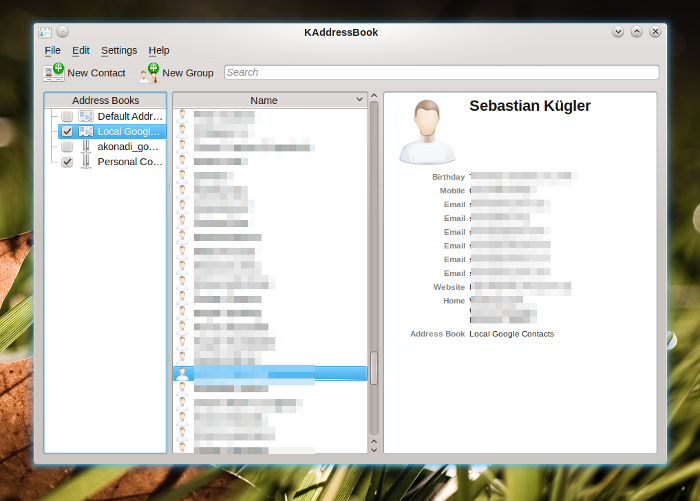
KAddressBook is already available in its Akonadi incarnationThe traditional Kontact, is of course still fully usable and we currently recommend this to end users. Kontact 4.4 is still actively maintained and supported, and is shipped by distributions along with KDE 4.5.0, so the current stable Kontact is 4.4.5. We did ship a new release of kdepimlibs, which are tested with Kontact 4.4.5 and are the basis for Kontact2 as well.

For normal workloads, KMail2 which is the heart of Kontact’s Mail component is already pretty usable. The focus of the stabilization and improvement efforts currently lies in the complex use cases common to hackers and email power users, such a different, high-volume email accounts, many large folders and a paranoid bunch of identities. Another area of focus is the migration of data, including the possibility to rollback to your “traditional” Kontact if you are not satisfied with the quality yet (please don’t forget to file bugs, so we can take proper care of those nasty insects).

Migration

Kontact2 only reads Kontact1’s configuration, but doesn’t change the original copy. Instead, a new configuration file derived from your old one will be used. So when first starting Kontact2, your “old” configuration, account setup, identities and filtering rules will be imported. KMail2 will also import locally cached emails, so you don’t have to download them all again. In the current state, user feedback from migration and usage is extremely valuable to the developers, so please give the next beta a whirl and report back to us, so we can improve on your experience. Of course, there are tools for importing and exporting data. During the migration, Kontact2 uses Kontact1’s existing downloaded email, so a lengthy re-download for offline reading is unnecessary.

If you’re not yet happy with the new Kontact, you can switch back to the old one, by re-installing the 4.4 Kontact.

What will KMail2 look like?

This might come as a little surprise to some, but in the initial version of KMail2, you won’t notice many differences to the traditional KMail1. This has a number of reasons: First of all, KMail’s UI is the result of years of polishing by the developers and a lot of feedback by the community. This won’t be thrown away for something that’s novel and cool, but might not satisfy most users. So KMail 2 will be a very straightforward port of KMail1, the UI will be mostly the same, while the underlying technology has changed completely. In the porting process to Akonadi, most of KMail1’s familiar UI has been kept.

The Akonadi-based Kontact betaYou might have noticed the first parts of KMail1 being converted. That is to say that the Kontact developers have worked towards the Akonadi port of KMail. The first, and actually one of the most central parts of KMail has already been introduced a while ago: the new listview. This listview is a rework of KMail’s list of messages to use the underlying Model-View-Controller design patterns that match Akonadi well. In Kontact 4.4, Kontact’s address book has been switched to use Akonadi. This first step in the migration was a bit painful, since it involved introducing a new infrastructure below applications that you use daily, and which you rely upon. The new possibilities are already making their way to the end users’ systems, for example in the calendar integration with the Plasma Desktop, which you can see in the screenshot. By clicking on the clock, you get the Plasma calendar which shows you your daily events. In the sceenshot, you can see the new version of KMail. As I’m using a full-HD display, I’ve enabled the widescreen layout of KMail. This makes it possible to see the whole email and a long enough list of others at once. A nice touch, which has been available for ages in KMail — just in case you wondered.

… but why the port then?

Simply put, traditional email clients don’t satisfy today’s expectations and work flows around personal data. Well, this of course needs some explanation: Already in times when KDE 3 was state-of-the-art, we noticed that more and more applications became interested in PIM data. Popular examples are Kopete, the instant messenger which held its own list of contacts, data which is mostly duplicated, including the inefficiency and maintenance nightmare you’re facing when you duplicate frequently changing information. So you want some kind of interface for contacts, and it should be something service-like, after all, you don’t want to run a seemingly unrelated application(your address book), just to get some more rich information about your chat contacts. Then, there’s of course my favourite example: Email monitoring. In essence, a full-fledged email client is a bit of an overkill, if you just want to know if there’s new email in your inbox. On of those overkill aspects is performance, or rather resource consumption. The solution to this is of course to share all this data. By using one central storage, and an easy to use access layer we can share the data across applications, and enable applications to make use of already available personal data. Enter Akonadi.

Akonadi has been built with performance and memory consumption in mind. Will Stephenson has put this very nicely: “In the 2.0 <= KDE <= 4.4 days, each program loaded the entire address book, calendars, and more specialised stuff like email, RSS feeds, and IM chat logs into its memory, so memory usage for PIM data increased linearly with the number of PIM apps running. Same goes for non-PIM apps using PIM data (the Kickoff menu's contact search data, Konqueror's Copy To IM Contact feature). Because Kontact is just a shell for KMail, KAddressbook, KOrganizer etc, it caused the same memory multiplication even though it's all one process.

With the Akonadi design, only the Akonadi process loads all the data into memory. Each PIM app then displays a portion of that data as it needs it, so the amount of extra resources taken by each extra PIM app is smaller, and the initial amount of memory used by each app is less. It should also provide extra stability, because each app no longer has to maintain its own data storage infrastructure, with all the caching, integrity and performance gotchas that keep computing science graduates employed.”

Plasma’s new email notifier

Plasma's Email Notifier (alpha version)During Akademy, I’ve picked up the work on Lion Mail again. It is not quite done yet, but already looking very good. I’m nearing feature completion for a first release now, so I’m almost sure it will become part of Plasma 4.6 in January, currently it’s in alpha state but quite fun already. Interested users can of course check out the source from SVN, it’s currently located in playground unti the code is ready for review by my eagle-eyed fellow hackers. Lion Mail is a set of Plasma widgets that can be used to display and manipulate emails in Plasma. In Tampere, Finland, during Akademy, I’ve discussed design and workflow of email notifications with a lot of people, after that I sat down for some serious hacking and have already implement most of what I would like to see, email-wise, in Plasma 4.6. The main goal is to be non-intrusive, and making it as easy as possible to manage your email in your daily workflow. The email notifier provides a queue of your emails, but does so without the need to switch to the full-blown KMail, so no full context / attention switch is needed if you just quickly want to see what’s going on in your inbox.

The new email notifier sits, as you might expect, in your panel’s notification area. It’s hidden by default, but becomes visible when there are new emails in your inbox. When you click on it, you get a list of your new messages. Those messages are expandable, so you can peek into the email to quickly judge if it’s something you want to act upon right away, or not. The individual messages are interactive. When hovered with the mouse, four buttons overlay the email. These buttons allow you to mark an email as read, or important (and of course remove those flags). Disappearing emails slowly fade out, so you have a couple of seconds to undo your action before the list is cleaned up.

You can choose to display new email in arbitrary foldersUnfortunately, most normal email notifiers are pretty useless for high-volume emailers, especially if you use server-side filtering (which you should because it’s much more convenient when using multiple clients, especially mobile ones). In my case, I have about 60 folders, on3 different email accounts (work-work, private, gmail). Emails are filtered before they reach the client. I am personally far less interested in new emails in all folders called “inbox”. The Plasma email notifier allows you to choose the folder you want it to monitor. You can also set up multiple folders. As a nice extra, you can choose to also display emails marked as important, either merged or in a separate list (actually, the latter is not implemented yet, but on my short-term TODO list :-)). Emails are draggable, so you can drag an email from the email notifier into a folder in KMail2 if you want to copy or move it there. As I mentioned before, we’re not actually dragging the email around, but an Akonadi reference as a URL. This is fully transparent between applications, and even across toolkit and access libraries. I’ve also written a full-fledged single email Plasmoid, which allows you to put individual emails on your desktop (or dashboard) for quick reference. Just drag the email from the list onto your desktop, and it’ll appear as Plasma widget there, expandable, with HTML if you’re into that. The missing bits are rather overseeable at this point: clearing the list, separate list for important emails, refreshing logic for individual folders and queuing the re-jigging of the list until the mouse moves out, so items don’t change under your mouse while clicking on them. Not just minor bugfixes, but at the current pace, also not a lot of work left to do.

PUSH IMAP

As you can imagine, the email notifier’s design suits itself very well for PUSH IMAP. PUSH IMAP means that instead of checking in intervals for new email, the server notifies your client when a new email comes in. This means less useless mail checks and more importantly instant notification when a new email arrives. With “instant” I mean within a couple of seconds. In my tests, it took between 3 and 17 seconds from pushing the “Send” button on one machine until the email showed up in the email notifier. That’s pretty neat compared to checking your email every 30 minutes or so. So it’s all the more important that new email notifications become too annoying, hence the non-intrusive approach to the UI. PUSH IMAP is currently only enabled for the inbox folder of a given IMAP account, and of course your server needs to support it. The first email received in Lion Mail using PUSH IMAP

Kontact Mobile

The migration of the desktop version of Kontact is another big step in Akonadi’s existence. Akonadi has its uses outside of Kontact on the desktop as well. The new Kontact Mobile suite builds on top of Akonadi as well, but offers a completely different UI, optimized for smartphones and touch-screen devices. Kontact mobile is part of the upcoming Kontact suite as well. The infrastructure is this way shared across the device spectrum while the user interface is optimized for a certain device and use case. Akonadi does the hard work of talking to all kinds of groupware servers in the background, and caching of this data if you want to make it available on the go. The Dot has an excellent article about Kontact mobile, including a cool screencast.

Beyond Groupware – Akonadi and the Social-Semantic Desktop

The new email notifier is a good example what Akonadi makes possible in the near future, but there are more things brewing in the kitchen. As Akonadi is a generic cache, it comes handy in a much wider number of use cases. In the future, Akonadi can take care of managing and caching all kinds of interesting data, as you can stuff into it what you want. One interesting case is managing your online photo collection. Akonadi can provide standardised photo streams locally on your machine which are backed up by online services. In the same vain, microblogging can be handled through Akonadi, free caching, searchability and semantic linking to your contact are made very easy this way. There is actually already a microblog resource for Akonadi available, I’ve heard rumours of a FlickR one as well…

Emails now also in the desktop searchAkonadi plugs into the Nepomuk semantic framework for its indexing and searching needs. Items in Akonadi are therefore magically available for applications using Nepomuk to query and display data. Tags and other metadata is shared across the desktop, arbitrary items can be linked semantically (think emails and attachments linked to contacts in your address book). Akonadi in Kontact does not only mean that Akonadi is coming to full bloom, but also the semantic desktop built on top of Nepomuk. One nice example is shown in the screenshot, where the KRunner mini-commandline (hit ALT+F2!) also finds emails now. Part of the semantic desktop are also the Activities, which provide context to applications. You can think of ‘context’ as a project your working on, your current location, and many other “metadata” of your workflow. One features of Lion Mail which has been part of its idea from the beginning is showing different sets of emails per activity, the email notifier is built with activities in mind.

Plasma’s dataengines provide another fantastic opportunity for Akonadi to shine. The Plasma team is working on a generic cache for data supplied by dataengines, the idea is to transparently allow caching of arbitrary data from dataengines, so offline usage becomes completely transparent for many Plasma widgets. Akonadi forms one of the cornerstones of Project Silk which aims at deeper integration of online services and content into the user experience.

Concluding

With all the above in mind, there’s little less than a revolution going on in the groupware area. Akonadi matures further and makes possible a full-fledged groupware client in the form of Kontact, with excellent scalability and extensibility. Akonadi is built with a whole spectrum of target devices in mind, which shows in the Kontact Mobile suite running successfully on a N900. With more applications being available in their Akonadi versions, Akonadi will become a lot more useful, and enhance many other applications in the process. Akonadi also allows for a better user experience around email and calendaring in the primary workspace. Groupware is becoming a generic service on the local client. The upcoming new Kontact groupware suite is only the tip of the iceberg of what’s coming thanks to Akonadi. Quite inspiring, isn’t it?

Special thanks go to Will Stephenson for proof-reading the article.

Working Upstream.

On the website of an Austrian (no kangaroos!) newspaper, I read an interview with Canonical’s Jono Bacon. In this interview, Jono talks about the process of developing central components of the desktop inside Canonical. The process is basically that Canonical’s design department, Ayatana develops components. When they are finished, they’re offered for inclusion into GNOME, which was not a successful in all cases yet. According to Jono this is "working upstream", explaining that in this context Ayatana is the upstream. GNOME is seen as a provider of components, building blocks for Ubuntu’s user experience.

The definition Jono handles of upstream development is quite different from how it works for me. I can speak of personal and professional experience in this context, as I have been working quite a lot on central components of the Plasma Desktop (and Netbook as well). I have done this work both, as a voluntary contributor in my Free time (pun intended), and continue to do so in my working hours for open-slx. open-slx happens to sell and support Linux deskop operating systems.

Nowadays, many of my contributions to Plasma and KDE in general are paid for by my employer, open-slx. As part of my job, I am allowed and intended to work inside KDE during working hours, this includes "hacking on Plasma stuff" as well as taking on some organizational load, such as working in the release team and the KDE e.V. Board. open-slx’ philosophy behind this is that it is essential to play nicely in the community as a company, and that selling a product which heavily relies on its user experience is made easier, not harder by working directly in the context and infrastructure of the project we intend to merge our creations into. In my case that’s KDE, and especially the Plasma team. This means that I commit my work directly to KDE’s source code repository, that design and technical decisions are being taken in the approriate upstream communities. This can happen for example during sessions at Akademy, at sprints, on IRC and most importantly on mailing lists such as plasma-devel@kde.org and kde-pim@kde.org.

The latter two are a nice example for a project I’m currently working on, the Akonadi-based email notification system. During Akademy, I sat together with a bunch of the KDE PIM developers, to design the new email notification system that will likely come along with Plasma and KDE PIM 4.6.0 next January. Over the past weeks, I’ve spent quite some hours on working out the plans. I’ve committed my changes to the code right away to KDE’s SVN to share them with others. Once the code is "good enough", it’ll be submitted for review and inclusion into Plasma or PIM, whatever makes more sense from a packaging point of view. It will be released together with Plasma 4.6 next year and through openSUSE 11.4 will be part of open-slx’s next product, the boxed version of openSUSE. This way, these contributions, the working hours my employer pays for trickle back into our product via downstream projects such as KDE Plasma and PIM teams, and openSUSE. The initial design of the new Plasma email notifications has actually been born during Camp KDE 2009 on Jamaica, but that’s a different story altogether. If you now are interested how that actually looks like, that will be the topic of another entry on this blog.

Let me get this straight, though. It makes sense to provide modifications to the user interface as add-ons that other companies with a similar product don’t ship. Also products based on Free Software need unique selling points in order to make their whole enterprise commercially interesting and viable, and thus make money flow into the development of Free Software.

On the licensing side, this is expressed in making it possible to write proprietary components, for example by using the LGPL license for libraries — Qt, kdelibs and libplasma are all licensed under the LGPL for exactly that reason. Technically, systems such as Plasma’s widgets which can replace any part of the whole Plasma Shell, be it the display of notifications (which Aurelien has actually proven by writing a Plasmoid that displays notifications according to Ayatana style guides), the taskbar, or all kinds of online services. From a branding point of view, the simplest case is probably slapping your branded wallpaper onto the default install. More advanced usages would be a customized Plasma theme, or maybe even "fingerprint animations", that make using your desktop feel a bit more special. For open-slx, Plasma turns out to be an excellent choice of toolkit to build an improved user experience upon, and that is true: we can virtually turn Plasma into any kind of product we like functionally, we can make it behave and look like exactly as we like, and we can maintain a clear separation between aspects we think are the unique selling point of our product, and the contributions we make directly upstream as part of being a good citizen in the KDE community.

The point here is that in order to sustain a Free Software eco-system such as KDE, or maybe GNOME (like in Canonical’s case) you need a healthy balance in your contributions to the upstream community, and your work to differentiate yourself commercially. It’s good practise to make a clear separation between the things you choose to be your USP and your Free Software contributions. Communicating clearly what your contributions are and where you are "commercially sensitive" is both essential: You want to create goodwill among developers that don’t get a paycheque from you (so-called "community support") when you need their help in a context that’s commercially sensitive to you, and which you want to keep separate for licensing and marketing reasons. Moreover, this clear distinction between your proprietary add-ons and your upstream contributions make it clear to customers why to buy your product, and not the competitor’s one.

Launching the Symbian Developer Cooperative

I’ve recently become involved in the Symbian Developer Cooperative, which is publicly launched today. My role as the president of the Board of Directors in this new organisation allows me to help opening up the Symbian ecosystem to individual contributors.

Last year, something pretty awesome happened. One of the world’s most widely used operating systems got released under a Free license. Nokia and her partners worked very hard, and were even able to get through the legal jungle that’s always involved in such high-profile projects very quickly. The result was that the source code for Symbian became available much quicker than initially thought it would. How’s that for a project finishing early, instead of late?

Some months ago I was contacted by the Symbian foundation, who were in the process of setting up the Symbian DevCo, a non-profit organisation registered in the US which will relay between the Symbian foundation and individual developers who wish to take part in developing and directing the future of the Symbian operating system. Coming from the mobile phone industry, which hasn’t been known to be very open in the past, the governance model of the Symbian ecosystem is very much aligned to what works for large corporations. That means that if you want to take part in decision-making, or in maintaining packages in the official Symbian upstream, you have to be a company. Now most players in this ecosystem are, but requiring to be a company can also pose potential barriers to those many who can bring a lot to the Symbian ecosystem. Being able to toy around and develop using a certain technology without any restrictions is at the heart of any open eco-system, and this is where the Symbian Developers Cooperative (or simply devco) comes in. The Symbian DevCo gives a voice to individuals involved in Symbian.

Taking part as an associate in the Symbian Developer Cooperative means that individuals now have

  • The ability to become a Symbian package owner
  • The ability to be nominated for a seat on the Symbian technology Councils
  • The ability to be nominated for a seat on the Symbian Board of Directors.

Those are three important privileges which have previously not been available for individual developers, and I think they’re absolutely critical to opening up the ecosystem, in tandem with Symbian’s source code. In order to low the barrier for participation even more, becoming an associate is free of charge.

My Role – President

That’s what it’s called officially. I’d personally much rather think of it as sanity checker and get-things-go’er. During our first board meeting, which happened last Tuesday, we talked a bit about the roles within the board. My prerogative was, from the beginning "Do not come back with a treasurer’s hat", as that would not be good for anybody involved. (I’m good at spending money, not good at keeping tabs, and even worse at that pesky thing called "acting responsibly". ;-) My idea of this role is to learn, to listen and to get people involved that really care about an independent governing process of the Symbian platform.

While I have to admit I’m rather green when it comes to Symbian, and its ecosystem, there are measures that should alleviate this. First of all, I’m an eager learner, and secondly, much more important, there’s the advisory board which does exactly this: Advise the board, bringing in expertise from the industry and the Symbian community. And if someone comes along who fits the shoe better, I’m all for passing it on. For now though, it’s important to get the thing running, and my experience in running the KDE e.V. together with my awesome fellow board members there comes as an advantage.

This position is voluntary, meaning I do it deliberately, and that I don’t get paid to do it. Well, technically, my awesome boss allows me to spend some of my work-time on this, but it’s all up to me how much that will be. After all I have this time-consuming hobby called KDE already (which also is part of my job). (This is just so I can say that I’m spending 60 hours or more a week on work-work, while in fact large part of work-work is fun-fun. Confusing, but awesome if you ask me.

Isn’t Symbian on the Demise?

It surely seems so. On the other hand, that doesn’t happen within a day or two, and according to analysts, we’re looking at at least another 5 years of Symbian being very relevant in the mobile space. A lot can happen in 5 years, so I think my time is definitely spent well. As of today, Symbian sales are still staggering: 260.000 Symbian-powered devices are sold each day, that’s slightly more than 3 per second (figures are based on the 1st quarter of 2010).

In the end, what matters to me is Software Freedom. Which technical implementation is leading us there is only secondary. If Software Freedom comes a bit closer today, and I think that’s what happened with the release of the Symbian operating system and the opening up of the ecosystem, I’m a happy person and glad to play my part. Taking this responsibility to lead in an area that’s traditionally (and understandable) a weak aspect of the Symbian (and in extension) mobile ecosystem is how I contribute to a world where Free Software is the norm, rather than the exception.

What about KDE?

Does this mean I will leave KDE? Surely not, my role in the Symbian DevCo is only part-time and voluntary. I’m as much motivated and committed to moving KDE forward as I have ever before. My involvement with Symbian will mainly have positive effects on my participation in KDE: my expertise and angle of view will expand, and like the Symbian DevCo benefits from my expertise in running a community-driven Free Software organisation, KDE and the KDE e.V. will benefit from the new insights and expertise I’m collecting as part of my involvement with the Symbian DevCo. Simply Symbiantik, isn’t it? (Ok, I just had to finish this boring blog entry with something really cheesy. Mmmhhhhmmm cheese…)